Best Free Options Trading Spreadsheets — Covered Calls, Wheel Strategy & Journal Templates
Looking for a free options trading spreadsheet download? This page compares seven templates across covered call tracking spreadsheets, wheel strategy spreadsheets, options tracker spreadsheet workflows, and options trading journal templates. For each one, you can see what it tracks, what you can do with it, and where manual spreadsheets start to break down as trading volume grows.
Use this as a shortlist for picking the right spreadsheet template. If you want a simple covered call tracker, a wheel strategy tracker, or an options trading journal template in Google Sheets or Excel, you can quickly find the best fit and skip templates that do not match your workflow.
Covered Call Tracking Spreadsheets
These two covered call spreadsheets serve different workflows. The first is cleaner and better for learning. The second is denser and better when you are logging many closed cycles.
Covered Call Tracking Spreadsheet (Simple)
If you want a free covered call tracking spreadsheet that is straightforward on day one, this is the easiest template to start with.
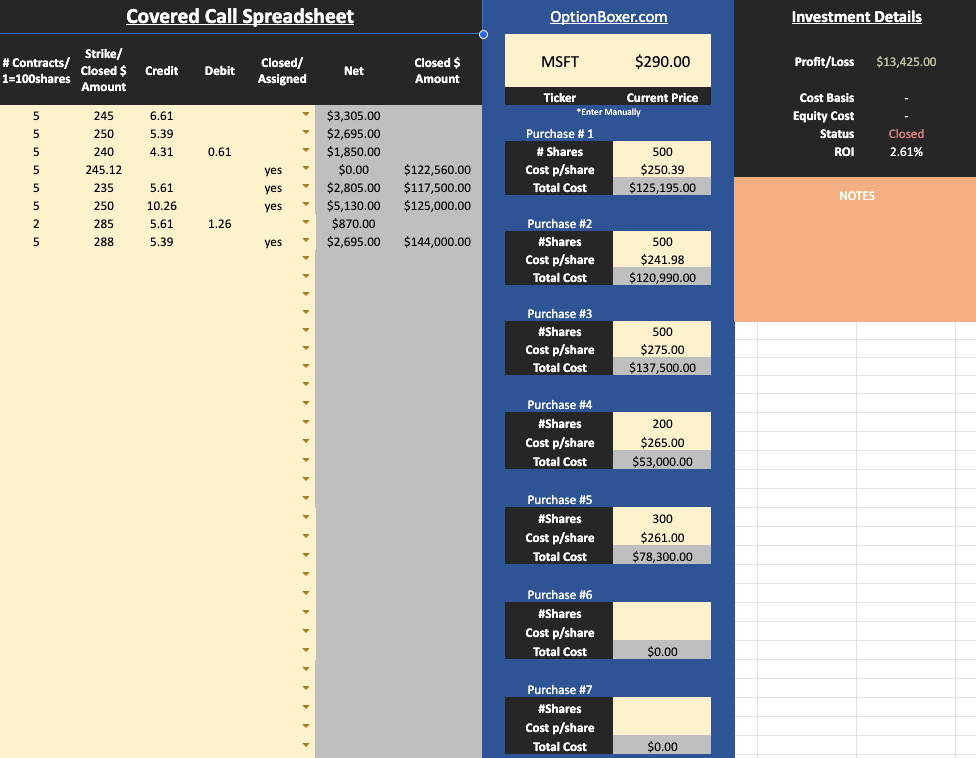
This sheet is built for one covered call campaign at a time, so it works best for newer traders, smaller accounts, or anyone who wants a clean process per ticker before scaling up.
You can enter separate stock purchase lots, track each call sale, log buy-to-close debits, and record assignment or stock sale outcomes. It gives you a clear way to see whether premium income is improving cost basis and whether the full campaign actually produced acceptable return.
Most useful things you can do with it:
- Track one covered call cycle from stock entry to final close without jumping across tabs.
- Compare net premium collected against stock movement and assignment outcome.
- Audit each completed cycle before repeating the process on another symbol.
The limitation is scale. Once you run many tickers or frequent rolls, manual updates become slower and portfolio-level visibility is limited.
Covered Call Tracking Spreadsheet (Active)
This covered call spreadsheet is better for active traders who want many completed trades in one table and quick performance comparison.

It fits intermediate accounts that cycle through covered calls regularly and need a row-based record of what is working across symbols, holding periods, and premium levels.
The sheet tracks invested capital, premium income, sold value, realized P/L, days held, and return percentages. Because it has extra premium columns, you can keep repeated sales or roll income attached to the same campaign record instead of splitting everything into separate mini-tracks.
Where this tracker is strong:
- Sorting closed campaigns by ROI, annualized return, days held, or dollar P/L.
- Comparing outcomes across many rows without switching between ticker tabs.
- Keeping covered call accounting compact when trade count grows.
The tradeoff is readability as the ledger gets longer. It is excellent for realized results but less useful for deep open-position monitoring, and it still depends on manual updates.
Wheel Strategy Spreadsheets
For wheel strategy spreadsheet tracking, the key difference is depth. One workbook is lifecycle focused, one is broad and multi-tab, and one leans heavily into dashboard-level account review.
Wheel Strategy Spreadsheet (Assignment Focus)
Among free wheel strategy spreadsheet options, this one stays closest to the real wheel lifecycle by separating contract activity from assigned and exercised shares.
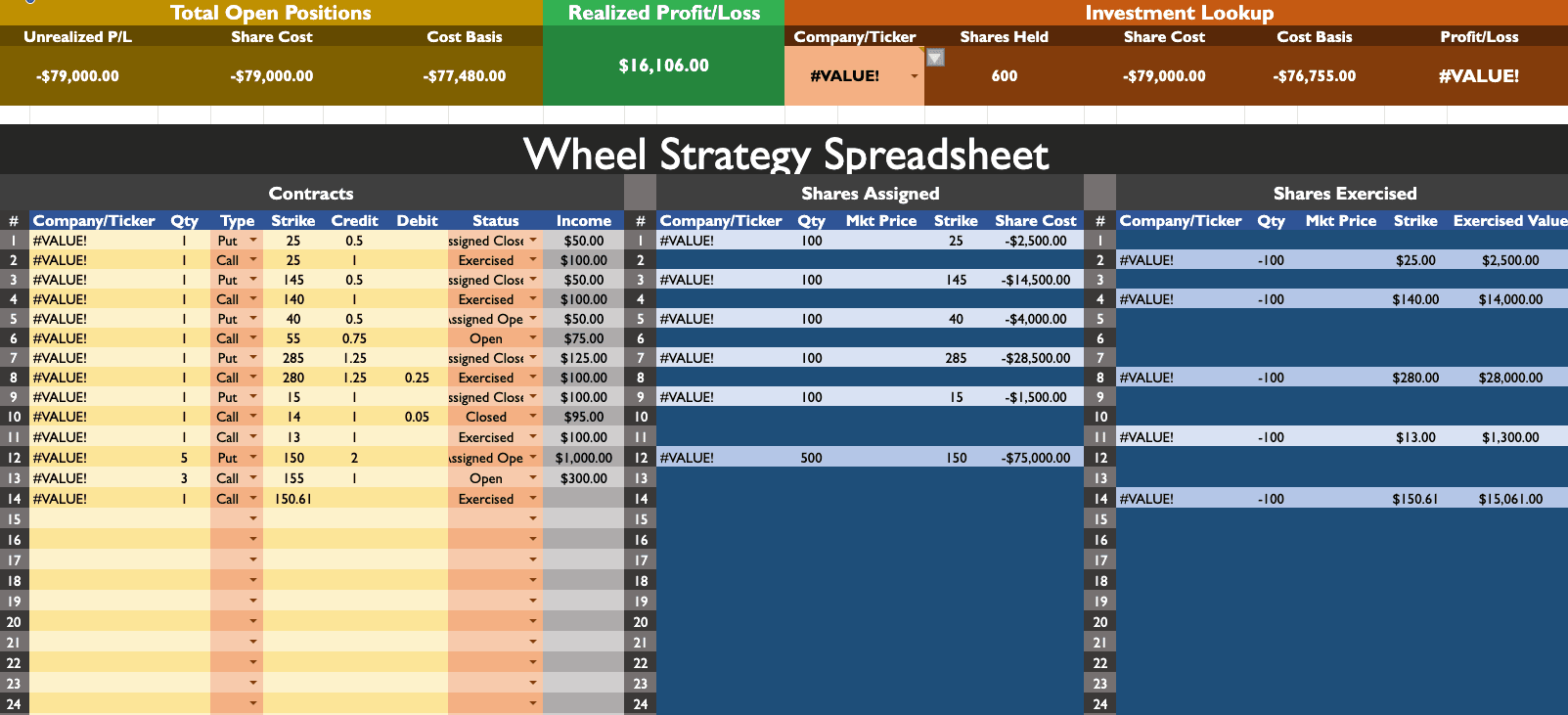
It is a good fit for wheel-first traders and cash-secured put sellers who get assigned often and want to track stock transitions clearly, not just option premiums.
You can log each put and call leg with strike, credit, debit, and status, then move trades through Open, Assigned Open, Assigned Closed, and Exercised. That makes it easier to see where a campaign sits and how basis changes over time.
Practical strengths in day-to-day use:
- Better visibility into assignment flow than generic option logs.
- Cleaner separation between contract records and stock outcomes.
- Useful ticker lookup once formulas are stable in your environment.
The main limitation is compatibility. Depending on Excel or Sheets version, helper formulas can need cleanup before everything calculates reliably.
Options Tracker Spreadsheet (Multi-Strategy)
This is the broad all-in-one options tracker spreadsheet in the list, built for traders running wheel strategies alongside other option workflows.

It fits intermediate and advanced accounts that track several symbols and do not want separate files for every strategy.
You can track open, closed, rolled, and expired positions by ticker, log assigned or called-away shares, and review premium contribution by underlying. The wheel tabs also include moneyness and days-to-expiration context, which adds more decision value than a simple trade ledger.
What this workbook can do that lighter templates usually cannot:
- Combine wheel tracking and broader option logs in one place.
- Provide ticker-level rollups alongside per-trade rows.
- Preserve assignment and stock-side context while tracking premiums.
The tradeoff is complexity. Formula links are easier to break, and exported Excel behavior can differ from native Google Sheets logic in certain tabs.
Wheel Strategy Tracker Spreadsheet (Dashboard)
This wheel strategy tracker spreadsheet feels more like a personal wheel dashboard than a plain transaction log.

It is best for income-focused personal accounts that care about weekly and monthly targets, holdings concentration, and cash-secured put exposure at the account level.
The trades table feeds charts and rollups, so you can review cash, earnings pace, and position mix while still keeping transaction-level detail. It also includes calculator sections for rough planning before entering a trade.
It is especially useful when you want to:
- Track progress toward income goals, not only per-trade P/L.
- See portfolio concentration and open wheel exposure in one dashboard.
- Keep planning, execution logging, and review in one workbook.
The limitation is that it is opinionated. If you do not follow row conventions and status discipline closely, dashboard outputs can drift.
Options Trading Journal Templates
If your goal is an options trading journal template or a flexible options tracker spreadsheet, these two are the strongest files in this section.
Options Trading Journal Template (Analytics)
If your goal is better decision quality, this is one of the strongest free options trading journal template files in the list.
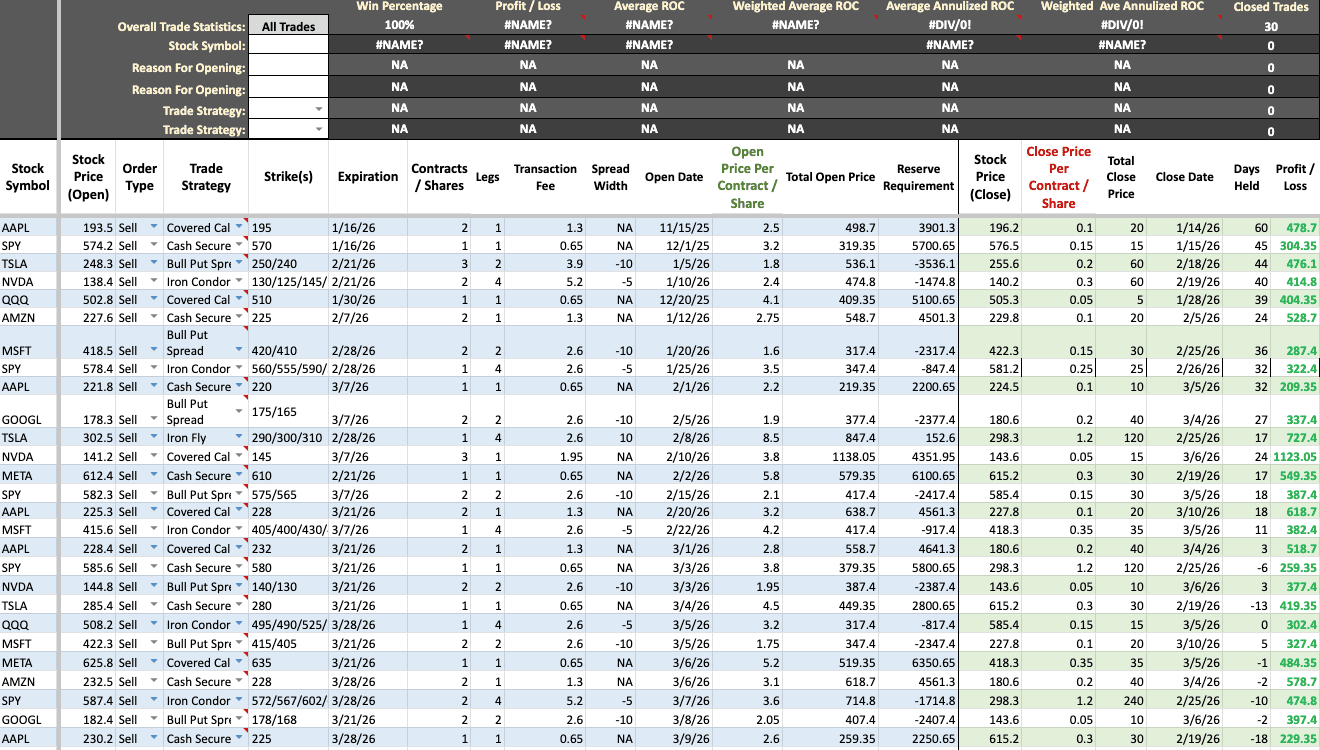
It fits traders who take journaling seriously, review their process every month, and want measurable feedback on strategy selection rather than only tracking premium totals.
You can record strategy type, entries and exits, fees, collateral context, and notes, then analyze win rate, ROC, annualized return, and monthly behavior. That makes it useful for identifying which setups hold up in your own history and which ones should be retired.
Where it adds the most value:
- Turning raw trade records into repeatable lessons.
- Reviewing performance by strategy and journal context.
- Spotting consistency trends in monthly results.
The tradeoff is effort. It requires disciplined input and more maintenance than lighter trackers, especially if you customize formulas heavily.
Options Tracker Spreadsheet (Single Table)
This free options tracker spreadsheet is one of the most practical single-table trackers in this set.

It fits self-directed traders who value speed, clean records, and quick auditability, especially if they log mixed option and stock events in one place.
You can record puts, calls, spreads, assignments, dividends, interest, and stock actions in the same ledger, with fields for dates, strike values, quantity, fills, fees, collateral, realized P/L, profit-per-day, ROC, and annualized ROC.
Most helpful day-to-day use cases:
- Fast event logging without tab switching.
- Quick return checks per closed row.
- Simple filtering and export for external analysis.
The limitation is guidance and visualization. It is efficient but lightweight, so portfolio-level dashboards and live automation are not built in.
When a Spreadsheet Isn't Enough
Spreadsheets can track a lot, but rolling chains still fragment across rows, wheel cost basis can drift after repeated assignment cycles, and live market context usually needs manual maintenance. That is where most templates start to lose reliability.
If you want an automatic options tracker with broker sync and real-time position context, OptionIncome is built for that workflow. You also get a dedicated wheel strategy tracker and a full options trading journal in one app.